A Repo That Mirrors Your Architecture - Source Control & Structure in Fabric
Your repo structure is your architecture, made versionable
This is Episode 3 of the From Chaos to Confidence series. In Episode 2 we designed the Fabric solition: layers, how granular to make them, and the fact that whatever you land on gets replicated across dev, test and prod. That architecture currently exists in the best possible place for an architecture to fail... in a diagram.
So let's make it real. Not automated yet, that's Episode 4, but versionable. The shift that matters is smaller than it sounds: your architecture stops being a drawing and becomes files. Folders you can open, text you can diff, names you can search. That's what turns it from a picture of intent into something that actually exists. Git is what you get once that's true. Branch it, review it, roll it back, hand it to a new colleague without a two-hour whiteboard session.
The thesis of this episode is a single sentence: your repo structure is your architecture, made versionable. If the two don't match, one of them is lying.
Why source control, before anything else
I've watched a lot of teams put off source control. Nobody ever decides against it. It just never becomes urgent. The platform works, people are shipping and nothing is on fire.
Then something is on fire. Someone changed a semantic model on Thursday afternoon. By Friday morning the numbers are wrong, and nobody can say what changed. With a Git repo, that's a five-minute diff and a revert. Without one, it's a support ticket and a memory contest.
Here's what you get the moment your platform lives in Git:
History and rollback: Every change becomes a commit with an author, a timestamp and a diff you can read. You can see what changed, who changed it and put it back.
Isolation: Branching lets you build something half-finished without anyone else seeing your half-finished thing. This is the difference between "development" and "everyone works in prod and hopes".
Collaboration without collisions: Two people, two branches, one pull request each. Nobody overwrites anybody. Nobody has to shout across the office to ask if it's safe to save.
Review before reality: A PR is the cheapest quality gate you will ever get.
Two-way sync: Fabric's Git integration isn't an export. You commit from the workspace and you update the workspace from Git. So the repo and the platform stay honest with each other.
"But Fabric already has version history"
Yes it does and this is the objection I hear often, so it deserves a fair answer.
Fabric notebooks have built-in version history: system checkpoints created automatically every five minutes as you edit, manual checkpoints for your own milestones, a diff view, and restore. Semantic models have it too. Neither is something you switch on. Fabric just configures it for you, which is part of why some teams may assume they're covered.
But it's an undo button, not source control, and the difference shows up in four places:
It's per item, not per solution: A notebook's history knows about that notebook. It has no idea the same change also needed a new field in a report or change to a query in a pipeline. A commit does, because a commit spans the whole solution.
It's shallow: Semantic models keep five versions, and restoring anything older than 14 days isn't supported. Notebook system checkpoints expire after a year. Git keeps every version for as long as the repo exists.
Most item types don't have it at all: Pipelines, lakehouses, reports, dataflows, environments, variable libraries... nothing. That list might improve, so check its current state rather than trusting me. But your platform will always be mostly items that aren't covered.
There's no branch, no PR, no review: Version history lets you go back. It doesn't let two people work in parallel, and it doesn't let anyone look at a change before it lands in the workspace.
Microsoft's own documentation lands in the same place. For full source control and support of more versions, use Git integration. And you can happily run both on the same semantic model. Item version history saves you from the last change you regret. Git is what gives your platform a memory.
Or, put less politely: without source control, your platform has no memory, no safety net, and no way to collaborate at scale.
How Fabric's Git integration actually works
The mechanic that shapes everything else is this: Git integration is configured per workspace, and a workspace connects to exactly one folder in one branch of one repository.
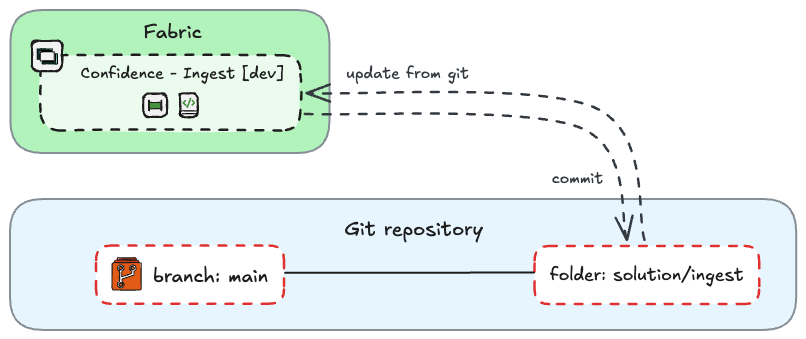
Four things to know before you design around it:
Providers. Azure DevOps, GitHub and GitHub Enterprise (cloud only in all three cases). Azure DevOps can live in a different tenant than your Fabric tenant, which comes up more often than you'd think in consultancies and post-merger estates.
Authentication. With Azure DevOps you can connect as yourself (the automatic credential, using your Entra identity) or through a configured connection that supports OAuth 2.0 or a service principal. And the service principal option is the one that matters, because it's what lets automation connect a workspace with no human signed in. GitHub's source control connector uses a personal access token. That asymmetry is worth knowing up front. If unattended automation is where you're heading, Azure DevOps currently gives you the cleaner identity story. (It's also the reason FabricOps supports both providers but treats the git credential as a connection rather than a login.)
What travels. Item definitions, not data. A lakehouse in Git is lakehouse.metadata.json and shortcuts.metadata.json. It's the shape of the thing, not a single row inside it. Semantic models arrive as TMDL, reports as PBIR, notebooks as source files. Coverage is broad these days. Very nearly every item type is supported, though some are still marked preview, including the two you'd least expect: reports and semantic models. And if a workspace does hold something unsupported, you can still connect it. Those items are simply invisible to Git. They aren't committed, synced or deleted, and they never appear in the source control pane at all. They're flagged as Unsupported in the workspace's Git status column, which is the only place you'll see them. Either way, check the current list rather than trusting this blogpost.
Folders are preserved. If you organise items into folders inside a workspace, those folders appear in the repo, and vice versa. Nested up to ten levels, empty folders aren't committed. And a small trap, connecting a workspace that already has folders to a branch that doesn't yet have them shows up as uncommitted changes. Commit first, update second.
There's more in the box these days than when I first started doing this: selective branching, related branches, comparing changes before you sync, branched workspaces, variable libraries for environment-specific values, and tooling in VS Code. I'm deliberately not going deep on any of it here. The branching workflow will be covered in a later episode. For now, all you need is the shape: workspace → repo → branch → folder.
One caveat worth saying out loud before we build on this: Git makes your platform versionable, not reproducible. A branch tells you what the items should look like. It doesn't create the workspaces, wire the connections or promise that dev and prod are the same shape. That's a different problem... and again something I will cover in a later episode.
The repo that mirrors your architecture
Here's the part I actually care about. You have seven layers (or three, or four. That is Episode 2's spectrum). A Git connected workspace connects to one folder. So:
One layer = one workspace = one repo folder.
That's it. That's the whole design. It sounds almost too simple to write down and it's the thing that makes everything downstream tractable.
But it has a consequence I glossed over in the first version of this post, and a reader was kind enough to point it out. If a workspace binds to exactly one folder, then a repo with seven flat folders only works when you have seven workspaces. At the Minimum tier, Engineering is one workspace holding ingest, prepare and orchestrate. It can bind to ingest/ or to prepare/, not both. Start small on a flat layout and the day you scale up you're peeling folders apart, which is a migration, not a promotion. That's the opposite of what Episode 2 promised.
The fix is to shape the tree like the floor. Episode 2's hard rule is that three layers is the minimum, never fewer. So the repo gets three top-level folders, and every responsibility below them is a folder you bind a workspace to when you're ready. This is the top of the FabricOps repo. So a real one and not just something idealised:
FabricOps/
├── .azure-pipelines/     # Azure DevOps pipeline definitions
├── .github/              # GitHub Actions workflows
├── automation/           # Scripts, environment definitions, IaC
├── documentation/        # Docs and design notes
└── solution/             # The platform, shaped like the Minimum tier


    ├── store/
    ├── engineering/
    │   ├── ingest/
    │   ├── prepare/
    │   ├── orchestrate/
    │   └── core/
    └── analytics/
        ├── model/
        └── present/
Read it top down and it's the Minimum tier: Store, Engineering, Analytics. Read the leaves and it's the Enterprise tier: all seven responsibilities, same names as Episode 2. The tree doesn't change between them. What changes is which folders have a workspace bound to them:
Minimum (3): Store, Engineering and Analytics each bind to a top-level folder. The responsibility folders show up as ordinary folders inside the workspace, because Fabric mirrors folders both ways.
Basic (4): Engineering keeps
engineering/. Model and Present each bind to their own leaf underanalytics/.Enterprise (7): Every leaf gets a workspace.
engineering/andanalytics/become nothing more than folders in the repo that no workspace binds to.
Someone who has read the architecture diagram can still navigate this repo and someone who has read the repo can still draw the diagram. They just draw it at whatever tier you're on.
core/ sits under engineering/ rather than at the top, and that's deliberate. Below the Enterprise tier there is no Core workspace, so environments, functions and the odd SQL database have to live somewhere, and Engineering is where they belong. Putting the folder there means a Core workspace can bind to it later without anything moving.
Go one level deeper and you get the items:
solution/
├── store/
│   ├── Landing.Lakehouse/
│   ├── Base.Lakehouse/
│   └── Curated.Lakehouse/
│       ├── .platform
│       ├── lakehouse.metadata.json
│       └── shortcuts.metadata.json
├── engineering/
│   ├── ingest/
│   │   ├── FabricOps_API.Notebook/
│   │   └── FabricOps_SQL.DataPipeline/
│   ├── prepare/
│   │   ├── FabricOps_functions.Notebook/
│   │   ├── Enrichment/
│   │   │   └── FabricOps_enrich.Notebook/
│   │   └── Utils/
│   │       └── ManageWorkspaceIcons.Notebook/
│   ├── orchestrate/
│   │   └── Load FabricOps.DataPipeline/
│   └── core/
│       └── Metadata.SQLDatabase/
└── analytics/
    ├── model/
    │   └── FabricOps.SemanticModel/
    │       ├── definition.pbism
    │       └── definition/          # TMDL
    └── present/
        └── FabricOps.Report/
            ├── definition.pbir
            ├── definition/          # PBIR
            └── StaticResources/
A few things worth pointing out because they're the details people trip over:
Every item is a folder named
<DisplayName>.<ItemType>. That's Fabric's convention, not mine, and it's what makes a diff readable.Enrichment/andUtils/underprepare/aren't responsibilities - they're workspace folders, mirrored into the repo. Responsibilities are the coarse structure. Folders inside one are yours to organise however your team thinks.Every item carries a
.platformfile, which holds its type, display name, description and alogicalIdthat ties the item in the workspace to its representation in the branch:{ "metadata": { "type": "Lakehouse", "displayName": "Curated" }, "config": { "version": "2.0", "logicalId": "edcd54d9-…" } }Rename an item by changing
displayNamein that file and not by renaming the folder. And never touch thelogicalId. It's the thread connecting workspace and repo and cutting it produces exactly the kind of afternoon you were trying to avoid.The lakehouse folders contain no data. Only metadata and shortcut definitions. Say this out loud to your stakeholders early. "It's all in Git" and "We can restore the data from Git" are very different statements.
Scaling a tier is a rebind, not a move
This is what the nested tree buys you. Going from Minimum to Enterprise is not a restructuring of the repo. It's creating new workspaces and pointing each at a leaf that already exists. The Engineering workspace bound to engineering/ is retired, and Ingest, Prepare, Orchestrate and Core each bind to their leaf. Going the other way works the same, so you can scale down if a domain shrinks. Nothing gets moved in Git. The logicalId in every .platform file stays put, so Git still knows every item by the same name it always did.
I want to be honest about what does change, because "retarget the workspace" makes it sound free and it isn't quite:
**References have to be dynamic, or they break. * ** Items in the new workspaces are new items with new IDs. A notebook that resolves its lakehouse by name won't notice. A pipeline or a report deployed through the tooling in Episode 4 gets its references resolved on the way in and won't notice either. A reference hardcoded to an ID will, and that's most of what people have before they automate. Design for automation and the split is just a run.
Shared code gets duplicated.
%runonly reaches notebooks in the same workspace. A helper used by both ingest and prepare has to exist in both once they're separate.Workspace settings don't travel. Permissions, capacity, Spark settings and the Git connection itself are per workspace and have to be applied to the new ones. With the recipe from Episode 4 that's a run. By hand it's an afternoon.
So it's cheap, reversible and genuinely not a migration of content. It's still a change you plan.
One thing the design depends on: items have to actually live in their responsibility folder. Fabric puts new items at the root of a workspace unless you say otherwise, and a notebook dropped at the root of Engineering belongs to no leaf, so the day you scale up it's a manual sort. The platform won't enforce that for you. Your repo can. A check in CI that fails the build when an item under engineering/ isn't inside a declared responsibility folder is about ten lines, and it's the difference between a convention and a guarantee.
Credit where it's due: the nested layout came from Sebastian in the comments on the first version of this post, which had the flat tree and exactly the problem he describes.
Mono-repo or multi-repo?
Start with a mono-repo. One repository, all layers, just as above.
The first reason is coordination. A change in Prepare that feeds a change in Model that surfaces in a Present report is one change to your platform, even though it touches three layers. In a mono-repo that's one branch and one PR, reviewed as a unit. Split across three repos, it's three PRs, in an order somebody has to remember, with no atomic way to roll back the middle one.
The second is documentation. Most teams keep their docs in Git too and docs belong next to the thing they describe: the architecture, the naming conventions, the runbook for whatever breaks at 2am. In a mono-repo that's one documentation folder and one place to look. Split the platform across five repos and you get five partial documentation sets, or a sixth repo that holds all the docs and starts drifting from every one of them the day it's created. Neither is a good outcome and the second is the one teams actually end up with.
You'd split when the people split, not when the folders get big:
Separate teams with genuinely separate release cadences (the Enterprise+ domain model from Episode 2 is the usual trigger)
Hard access boundaries where one team must not read another's source;
A repo that has grown so large that clone and CI times hurt. It's real, but rarer than people expect for item definitions, which are mostly small text files.
Even then, my preference is to split by domain (all of Finance's layers together) rather than by layer (everybody's Model workspaces in one repo). Splitting by layer maximises cross-repo chatter which is the thing you were trying to avoid.
Tip: this is a decision you can defer cheaply, and reverse expensively. Mono-repo until it hurts - and be specific about what "hurts" means when you claim it does.
The mapping, made concrete
Put it all together and every row of this table is a fact you can check, not a convention you have to remember. Same folders at every tier. Only the workspace column changes:
| Repo folder | Minimum (3) | Basic (4) | Enterprise (7) |
|---|---|---|---|
solution/store |
Store | Store | Store |
solution/engineering |
Engineering | Engineering | folder only |
solution/engineering/ingest |
↑ | ↑ | Ingest |
solution/engineering/prepare |
↑ | ↑ | Prepare |
solution/engineering/orchestrate |
↑ | ↑ | Orchestrate |
solution/engineering/core |
↑ | ↑ | Core |
solution/analytics |
Analytics | folder only | folder only |
solution/analytics/model |
↑ | Model | Model |
solution/analytics/present |
↑ | Present | Present |
Where the arrow points up, that folder syncs as part of the workspace above it. Workspace names follow the same template whatever the tier: Confidence - Store [dev], Confidence - Engineering [dev] and so on.
And now the environment axis from Episode 2 quietly pays for itself. Note what isn't in the repo: there's no store-dev sitting beside a store-test. One folder per responsibility, whatever the tier. Nine folders, and nine, twelve or twenty-one workspaces depending on how far you've split. What differs between environments isn't the folder, it's how the content arrives, and that is easier to draw than to describe.
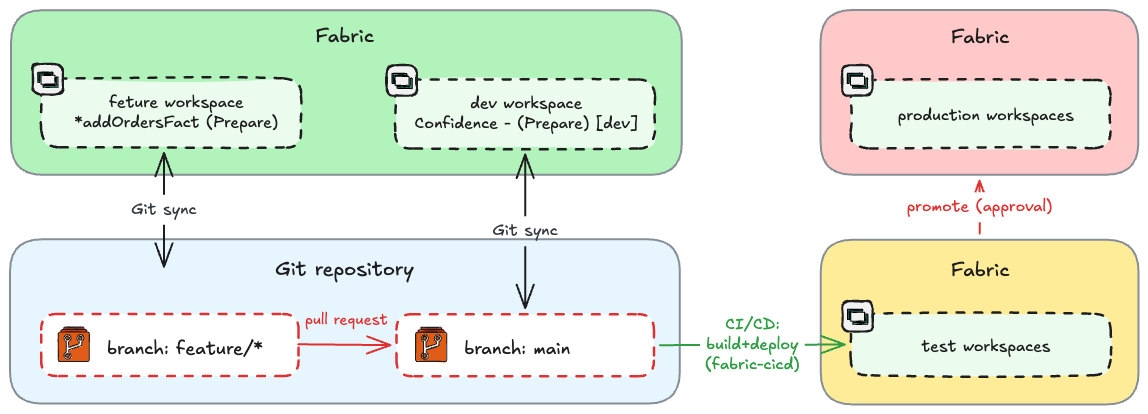
That topology is a choice, not a rule, so let me explain my approach. I keep dev Git-connected because it mainly buys you two things nothing else does. Every merge to main gets proven against Fabric's own Git engine before it goes anywhere near a release, and the source control pane becomes a drift report anyone can read. No pipeline history to dig through to find out whether the workspace matches the branch.
I keep test and prod out of Git for two reasons. The first is that promotion should be a decision someone makes, not a side effect of a merge landing. The second is more mechanical and it's the one that settles the argument: item definitions carry environment-specific references. A semantic model points at a particular SQL endpoint, a notebook at a particular lakehouse, a pipeline at a particular connection. Sync prod straight from a branch and you've handed prod the dev GUIDs. Something has to rewrite those references in flight, which makes promotion a deployment concern rather than a sync concern. That's the job of fabric-cicd, Microsoft's own Python library for exactly this problem. It mutates the item definitions on the way into the target workspace, resolving references at deploy time so test gets test's GUIDs and prod gets prod's. Variable Libraries cover some of this ground and Microsoft recommends them where they fit. They're scoped to a single workspace though, which is awkward when your architecture is deliberately seven of them. Also semantic models aren't among the item types that can consume one. I'll walk through both in a later episode.
And Fabric happily supports the alternatives. You can give every stage its own branch and sync each workspace from it, which makes Git the literal source of truth per environment. You can go the other way and connect nothing but feature workspaces, deploying to dev, test and prod through the same pipeline. This is kind of what Microsoft's own internal data engineering team does, and it has the tidy property that there's only one path into a workspace. Both are defensible. Mine is the middle and I'll make the full argument in a later episode, where the branching workflow belongs.
The mechanics of all of it: branching workflow and promotion are coming. The structure that makes them possible is what we're laying down here.
Conventions worth agreeing on before the first commit
None of these are clever. All of them are cheaper now than later.
Naming. Item display names become folder names, so the naming discipline you agreed in Episode 2 shows up in your directory listing whether you meant it to or not. Keep environment out of item names. The workspace already carries it. Curated, not Curated_dev_v2. Better still, don't rely on discipline for the workspace names at all. In FabricOps the name is a template, Confidence - {layer} [{environment}], substituted at provision time. Nobody can typo a workspace name into existence, because nobody types workspace names.
What lives outside solution/. Everything that operates the platform rather than being it: .github/ and .azure-pipelines/ for workflows, automation/ for scripts and environment definitions, and documentation/ for the things a new colleague needs: the architecture, the naming conventions and the reference for whatever configuration your automation reads. This separation matters more than it looks: solution/ is the only part Fabric syncs, so anything else you keep in the repo is yours to organise freely. It travels with the platform it deploys, reviewed in the same pull request. Documentation that lives next to the solution it documents actually has a chance of staying true.
What not to commit. Secrets, obviously, so NO PATs, no client secrets, no connection strings with a password in them and no credentials.json that "was only for testing". Also: local environment folders, editor junk (.DS_Store is a personal grudge) and anything a run produces rather than a human writes. Put the rules in .gitignore on day one and add a scan to CI when you get the chance. The interesting thing about committed secrets is that removing the file doesn't remove the history.
But wait! How do I get all this created and wired up?
This is exactly the right question and exactly where this episode stops.
Look at what we've just specified: seven workspaces per environment at the Enterprise tier, each with the right capacity, the right permissions and the right items inside. Three environments, so twenty-one workspaces. The seven in dev each need a Git connection on top of that, pointing at its own folder in the right branch of the right repo, with the right git credential. And then you do it all again, identically, when someone adds a layer or a new environment or a fourth domain.
You can absolutely do that in the portal. I've done it. It takes an afternoon and it works. But it is quietly turning wrong because the one thing hand-wiring cannot give you is the guarantee that dev, test and prod are actually the same shape.
So in Episode 4 we stop clicking. We'll look at the options for setting this up as infrastructure-as-code covering the Fabric CLI, REST APIs, fabric-cicd and more. And where each of the tools and services fits in. Then we will go deep on how FabricOps does it all: a declarative definition of your platform that provisions the workspaces, creates the items, wires the git integration and can tear the whole thing down again. Including the bit nobody shows you: what happens when you run it twice.
Stay tuned!


